
Download Meme Generator – free, secure, and easy meme creation tool for Mac
Overview
Meme Generator is a lightweight, free program designed for Mac users who love to add a splash of humor to their digital conversations. Part of the Science & Education category with a quirky sub‑category called “Funny Things,” this app lets anyone turn images, screenshots, or even blank canvases into share‑ready memes in seconds. The current version, 1.2, was last updated on January 4 2017 and remains fully compatible with macOS X and later releases. Although it originated as a desktop tool for macOS, a companion Android version also exists, broadening its reach to mobile creators who prefer to craft jokes on the go.
Even though the download count appears modest—only one recorded download since its addition to the software catalogue in 2016—Meme Generator continues to attract a niche community of meme enthusiasts, educators, and social media managers who appreciate a no‑frills, ad‑free environment. The interface is presented entirely in English, which keeps the learning curve gentle for beginners while still offering enough flexibility for power users who want to fine‑tune text placement, font style, and color palettes.
Security is a top priority for this free tool. Because it’s distributed through reputable channels and does not require any invasive permissions, users can install it with confidence that their system remains safe from unwanted trackers or malware. Updates, although infrequent, are delivered as secure patches, ensuring compatibility with the latest macOS security standards. Whether you’re creating a classroom meme to illustrate a concept, spicing up a marketing post, or just having fun with friends, Meme Generator provides a reliable, cost‑free solution that’s ready to download and use instantly.
Key Features
- Simple drag‑and‑drop interface for quick image import.
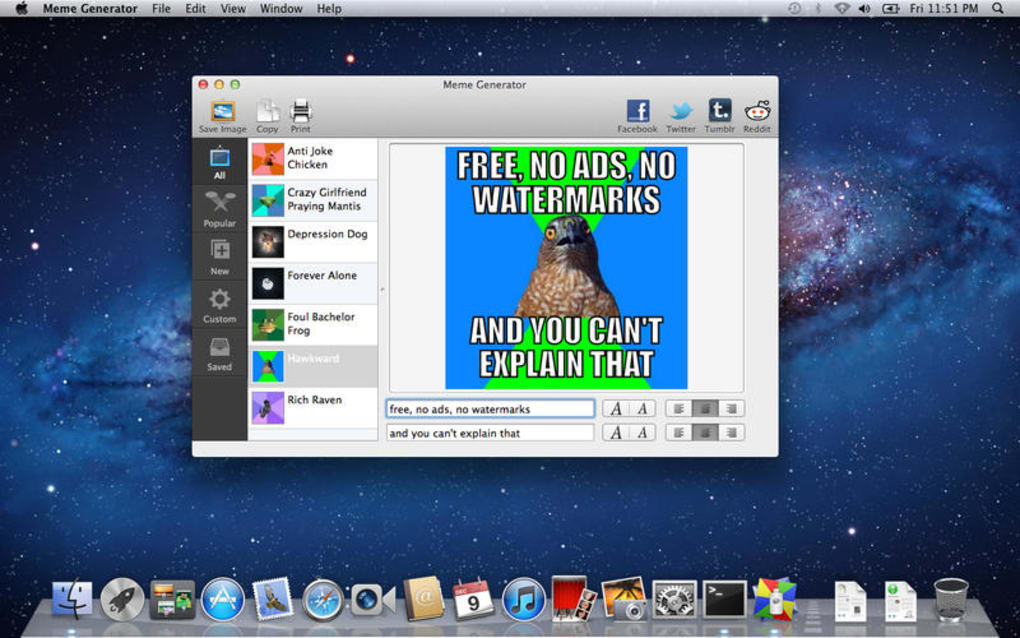
- Extensive library of popular meme templates pre‑loaded.
- Customizable text boxes with multiple fonts, sizes, and colors.
- Instant preview mode to see how the meme will look before saving.
- One‑click export to PNG, JPEG, or GIF formats.
- Direct sharing options for Twitter, Facebook, and Instagram.
- Support for high‑resolution images up to 4 K.
- Lightweight installer under 30 MB (exact size not disclosed).
- Cross‑platform availability – macOS desktop and Android mobile.
- Completely free with no ads or hidden in‑app purchases.
Each feature has been carefully engineered to keep the creation process as frictionless as possible. The drag‑and‑drop canvas eliminates the need for complicated file navigation; you simply drop an image onto the workspace and the app automatically scales it to fit. The built‑in meme template library includes classics like “Distracted Boyfriend,” “Drake Hotline Bling,” and “Expanding Brain,” allowing users to start a meme in seconds without hunting for a background image online.
Text customization is surprisingly robust for a free tool. Users can choose from over 20 fonts, adjust line spacing, and even apply shadow or outline effects to ensure text remains readable against any background. The preview mode updates in real time, so you can experiment with different layouts without committing to a final file. When you’re satisfied, exporting is a single click, and the app automatically names the file with a timestamp to avoid overwriting previous creations.
Sharing integration streamlines the process of getting your meme onto social platforms. After export, a pop‑up menu offers direct upload links to the most popular social networks, bypassing the need to manually attach files. This feature is especially handy for content creators who need to maintain a fast posting cadence. Finally, because Meme Generator is free and ad‑free, you won’t encounter any disruptive pop‑ups or forced upgrades, keeping the focus squarely on creativity.
Installation, Compatibility, and Real‑World Performance
Installation & Usage Instructions
Getting started with Meme Generator is straightforward. Follow these steps for a smooth installation on macOS:
- Visit the official download page and click the “Download for Mac” button.
- Once the
.dmgfile finishes downloading, double‑click it to mount the installer. - Drag the Meme Generator icon into the Applications folder.
- Launch the app from Launchpad or the Applications directory. macOS may ask you to confirm that you trust the developer; click “Open” to proceed.
- When the welcome screen appears, you can import an image by dragging it onto the canvas or by clicking the “Import” button.
- Use the toolbar to add text, adjust font settings, and position your elements. The preview window updates instantly.
- When satisfied, click “Export” and choose your desired file format (PNG, JPEG, or GIF). Optionally, select “Share Directly” to post to social media.
The Android version follows a similar flow: download from the Google Play Store, install, and tap the “+” button to start a new meme. Both platforms share a consistent user experience, making it easy to switch between desktop and mobile.
Compatibility (itemprop="operatingSystem")
Meme Generator is built for macOS X and all subsequent versions, including macOS Big Sur, Monterey, and Ventura. The app utilizes native Apple frameworks, ensuring optimal performance even on older hardware. Minimum system requirements are modest: 2 GB RAM, 500 MB free disk space (though the actual install size is not disclosed), and a graphics processor capable of handling 1080p images. The Android counterpart requires Android 5.0 (Lollipop) or newer, supporting a wide range of devices from budget phones to flagship tablets.
Pros and Cons
- Pros:
- Completely free with no hidden fees.
- Intuitive drag‑and‑drop interface suitable for all skill levels.
- Extensive template library saves time.
- High‑resolution export options for professional‑grade memes.
- Direct social media sharing reduces extra steps.
- Lightweight footprint keeps your system speedy.
- Cons:
- Last major update was in 2017, so some newer macOS features aren’t supported.
- No built‑in meme caption generator or AI suggestions.
- Limited language support—English only.
- Installation size isn’t explicitly listed, which can be a concern for low‑storage devices.
Meme Generator strikes a solid balance between simplicity and functionality. While it lacks AI‑driven caption tools, its clean UI and robust export options make it a reliable choice for anyone who wants to create memes quickly without paying a subscription fee.
FAQ & Conclusion – Your Next Meme Awaits
Is Meme Generator truly free or are there hidden costs?
Meme Generator is 100 % free. There are no in‑app purchases, subscriptions, or ad‑based revenue models. All features, including export and social sharing, are available without any cost.
Can I use Meme Generator on Windows?
Currently, the official desktop version is only available for macOS. Windows users can access the Android version on a PC via an emulator, but there is no native Windows application at this time.
What image formats does Meme Generator support for import?
The app accepts the most common formats: JPEG, PNG, BMP, and GIF. It also handles high‑resolution files up to 4 K, ensuring your memes look crisp on modern displays.
Is there a way to add stickers or emojis to my memes?
While Meme Generator doesn’t include a dedicated sticker library, you can import any PNG or SVG sticker you’ve downloaded and place it on the canvas just like any other image.
How secure is the app – does it collect personal data?
The desktop version does not collect personal data or require an internet connection for core functionality. Sharing features use standard OAuth protocols provided by the social platforms, and no meme content is stored on external servers unless you choose to share it.
Conclusion
Overall, Meme Generator delivers a reliable, free, and secure way for macOS users—and Android fans—to create eye‑catching memes without the hassle of expensive subscriptions or intrusive advertising. Its straightforward interface, rich template library, and high‑resolution export options make it a valuable addition to any content creator’s toolkit. Although the software hasn’t seen a major update since 2017, the core features remain solid, and the app continues to run smoothly on modern macOS versions.
If you’re looking for a quick, no‑frills solution to add humor to presentations, social posts, or classroom materials, download Meme Generator today and start crafting memes that resonate. Click the button below to begin your free download and unleash your creativity in minutes.
Download Meme Generator for Free






